


Kystar U3 / U3 Pro LED Video Processor, 3 Windows
Price range: $ 586.00 through $ 971.00
Kystar U3 and U3 Pro LED video processors with three image windows, preview monitoring and input backup. U3 offers two splicing outputs plus preview; U3 Pro offers four outputs. Confirm the required variant and input configuration.
U3 and U3 Pro LED video processors
The Kystar U3 and U3 Pro support three adjustable image windows, multi-format sources, preview monitoring and input backup. Their output arrangements differ: the U3 provides two splicing outputs and a preview output, while the U3 Pro provides four outputs for larger spliced layouts.
Technical specifications
| Parameter | Specification |
|---|---|
| U3 copy-mode output | User-defined output up to 2.6 million pixels per port |
| U3 splicing mode | Up to 2560 × 1536 at 60 Hz; 2 × 1 or 1 × 2 layout |
| U3 output arrangement | 2 splicing outputs and 1 preview/monitoring output |
| U3 Pro output arrangement | 4 outputs; horizontal, vertical and cross splicing |
| U3 Pro user-defined output | 5.2 million pixels |
| Image windows | 3, with independent size, position and layer order |
| Input connections | 1 × DVI, 1 × HDMI, 2 × VGA, 2 × CVBS, 1 × SDI and 1 expansion slot |
| Maximum listed input resolution | 4096 × 2160 with a suitable 4K input configuration |
| Control | Ethernet or serial communication through Kystar software |
| Image tools | Luma key, transparency, edge feathering, overlays and independent input brightness |
Choose the output layout for your display
Use the model-specific output figures when planning a main screen and side screens. Copy-mode capacity and splicing-mode resolution describe different configurations. Confirm the selected model, installed input option and output timing before ordering.
Preview, overlays and source switching
Both models support local preview and output monitoring, with Ethernet monitoring through Kystar management software. Three image windows can be arranged independently, and image/text overlays can be added to the video. Source and preset transitions provide multiple effects.
Configure a backup source to maintain a usable signal if the primary input fails. Input brightness, transparency and edge feathering can be adjusted to suit the layout.
Frequently asked questions
What is the difference between the U3 and U3 Pro?
The U3 has two splicing outputs plus a preview/monitoring output. The U3 Pro has four outputs and a listed 5.2-million-pixel user-defined output capacity. Check the output mode and selected model before purchase.
How many image windows can either model display?
Both support three image windows with independent size, position and layer order.
Is 4K supported on every input?
No. The listed maximum of 4096 × 2160 requires a suitable 4K input configuration. Verify the installed HDMI 1.4 or Dual Link DVI arrangement and supported timing.
Where are the U3 and U3 Pro software downloads?
The existing specification and control-software links are retained below. Confirm the package is appropriate for your exact model and firmware.
How do I confirm the price for U3 or U3 Pro?
Check the model selection and price shown on this product page. Confirm the required variant and input configuration with LED-Mall before ordering.
Product image and downloads
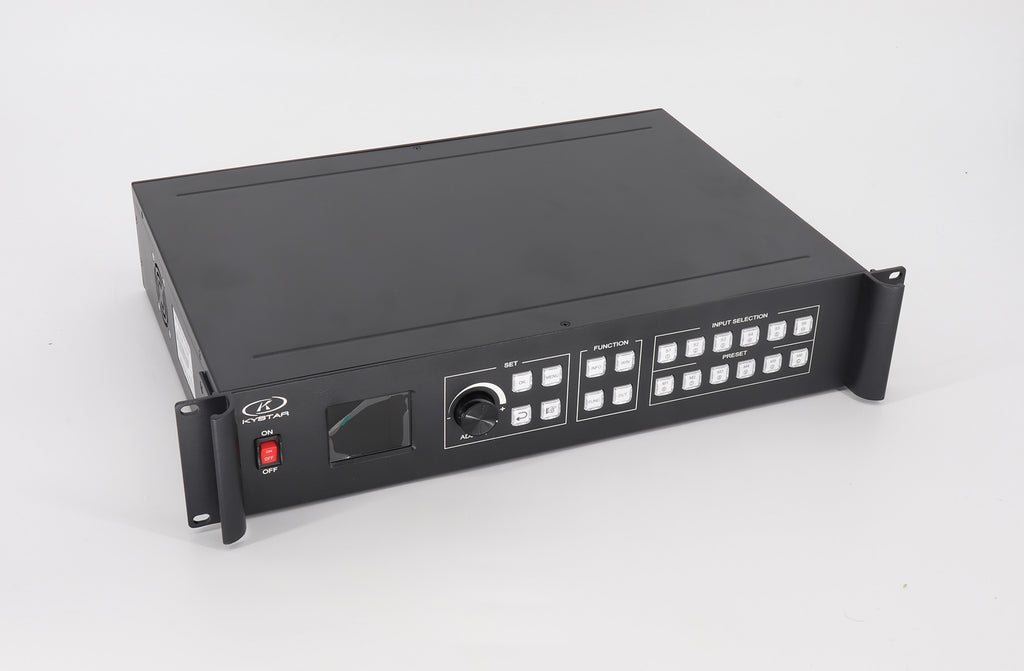
Download Specification:
Kystar U3 U3Pro Specification
Download Software:
Kystar U3 U3Pro Control Software (All Kystar Processor)
Kystar U3 U3Pro Control Software (Three-in-One)
| Weight | N/A |
|---|
Be the first to review “Kystar U3 / U3 Pro LED Video Processor, 3 Windows”
You must be logged in to post a review.
Will I be charged with customs and taxes?
The prices displayed on our site are tax-free (in US Dollars), which means you may be required to pay import duties and taxes once you receive your order. Import taxes, duties, and related customs fees will be determined by your local customs office when your order arrives at its final destination.
Please note that these additional charges and taxes are your responsibility, and we do not take any responsibility for them. We are not liable for paying or reimbursing any customs duties, taxes, or related fees. For more details on these charges, please contact your local customs office.
Shipping
We can ship to virtually any address in the world. Note that there are restrictions on some products, and some products cannot be shipped to international destinations..
When you place an order, we will estimate shipping and delivery dates for you based on the availability of your items and the shipping options you choose. Depending on the shipping provider you choose, shipping date estimates may appear on the shipping quotes page.
Please also note that the shipping rates for many items we sell are weight-based. The weight of any such item can be found on its detail page. To reflect the policies of the shipping companies we use, all weights will be rounded up to the next full pound..
Returns Policy
You may return most new, unopened items within 30 days of delivery for a full refund. We'll also pay the return shipping costs if the return is a result of our error (you received an incorrect or defective item, etc.)..
You should expect to receive your refund within four weeks of giving your package to the return shipper, however, in many cases you will receive a refund more quickly. This time period includes the transit time for us to receive your return from the shipper (5 to 10 business days), the time it takes us to process your return once we receive it (3 to 5 business days), and the time it takes your bank to process our refund request (5 to 10 business days).
If you need to return an item, simply login to your account, view the order using the "Complete Orders" link under the My Account menu and click the Return Item(s) button. We'll notify you via e-mail of your refund once we've received and processed the returned item..
Related products


Reviews
There are no reviews yet.