
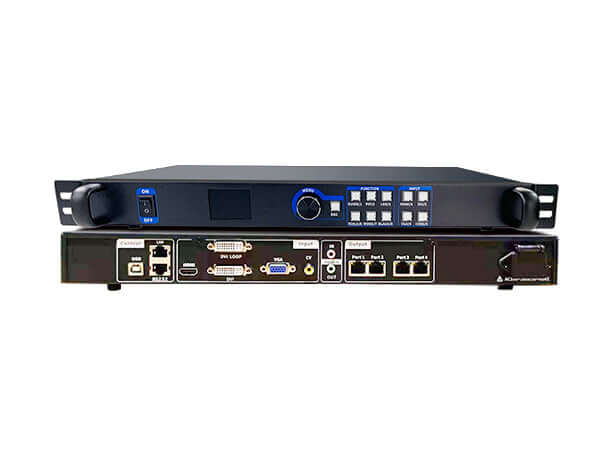
Mooncell MVB4S Pro 2-in-1 LED Video Processor
$ 198.00
Mooncell MVB4S Pro combines LED video processing with four network outputs and HDMI/DVI dual-screen display. Check the model and loading capacity carefully: the existing download describes MVB4S rather than MVB4S Pro.
888 in stock
MVB4S Pro processing and LED display control
The Mooncell MVB4S Pro is listed as a 2-in-1 LED video processor with four network outputs, front-panel screen setup and dual-screen display using HDMI and DVI sources. Its picture-in-picture, overlay and scheduled switching functions support presentations that need more than a single full-screen source.
Model note: the original product page names MVB4S Pro, while the retained specification PDF names MVB4S. The Pro listing gives 2.6 million pixels and one HDMI input; the PDF gives 2.5 million pixels and lists two HDMI inputs. The table preserves the Pro listing’s claims and identifies the conflict. Electrical ratings and dimensions from the non-Pro PDF have not been assigned to this product.
Technical specifications
| Parameter | Specification |
|---|---|
| Product model | Mooncell MVB4S Pro 2-in-1 LED screen video processor |
| LED outputs | 4 network output ports |
| Total loading capacity | Original MVB4S Pro listing: 2.6 million pixels. The linked MVB4S PDF states 2.5 million for that model; Pro capacity needs confirmation against the exact hardware revision. |
| Per-port capacity | 650,000 pixels, as listed for MVB4S Pro |
| Maximum layout width / height | 3840 pixels wide or 1920 pixels high; separate limits, subject to the applicable total pixel capacity |
| Listed video inputs | 1 × VGA, 1 × DVI, 1 × HDMI and 1 × CV |
| DVI loop connector | 1 × DVI LOOP, listed separately from the source inputs |
| Audio | Independent audio input and separated audio output |
| Dual-screen display | HDMI and DVI can display simultaneously; picture-in-picture or picture-outside-picture, with adjustable size |
| Source transitions | Instant switching or fade-in/fade-out between input channels |
| Overlay functions | Graphic/text overlay and keying for subtitles and image composition |
| Scaling and setup | Point-to-point scaling, adjustable image position, front-panel knob/button operation and guided setup |
| Scheduled functions | Timed signal switching and brightness adjustment |
| System functions | Multi-unit cascade splicing, custom EDID management, voltage/temperature self-test and engineering time lock |
| Specification-document identity | The retained download is titled MVB4S Product Specifications, without Pro. Its electrical ratings, dimensions, USB playback specifications and detailed interface counts are not treated as verified Pro specifications. |
Product images and specification download

Download the original MVB4S specification PDF (Pro applicability unconfirmed)
Frequently asked questions
Is MVB4S Pro the same model as MVB4S?
The product listing is for MVB4S Pro, but its existing PDF is titled MVB4S. The sources differ in loading capacity and interface details, so they should not be treated as identical hardware. Confirm the model label and revision when ordering or replacing a unit.
Does MVB4S Pro support 2.6 million pixels?
The original Pro listing states 2.6 million pixels in total and 650,000 per network output. The linked non-Pro MVB4S PDF states 2.5 million in total. This discrepancy is unresolved; confirm the applicable Pro limit before finalizing the screen layout.
Can HDMI and DVI be displayed together?
The original MVB4S Pro listing specifies simultaneous HDMI and DVI display, with picture-in-picture or picture-outside-picture and adjustable image size.
Can the screen be configured without a computer?
The listing describes front-panel setup using the knob and buttons, plus a guided setup mode for quick screen connection. It also lists custom EDID management and point-to-point image scaling.
What should I check before buying an MVB4S Pro replacement?
Match the Pro model label, hardware revision, video connectors, receiving-card setup and required pixel load. Use the linked PDF as MVB4S reference material only until its applicability to the Pro unit has been confirmed.
| Weight | 7 kg |
|---|
Be the first to review “Mooncell MVB4S Pro 2-in-1 LED Video Processor”
You must be logged in to post a review.
Will I be charged with customs and taxes?
The prices displayed on our site are tax-free (in US Dollars), which means you may be required to pay import duties and taxes once you receive your order. Import taxes, duties, and related customs fees will be determined by your local customs office when your order arrives at its final destination.
Please note that these additional charges and taxes are your responsibility, and we do not take any responsibility for them. We are not liable for paying or reimbursing any customs duties, taxes, or related fees. For more details on these charges, please contact your local customs office.
Shipping
We can ship to virtually any address in the world. Note that there are restrictions on some products, and some products cannot be shipped to international destinations..
When you place an order, we will estimate shipping and delivery dates for you based on the availability of your items and the shipping options you choose. Depending on the shipping provider you choose, shipping date estimates may appear on the shipping quotes page.
Please also note that the shipping rates for many items we sell are weight-based. The weight of any such item can be found on its detail page. To reflect the policies of the shipping companies we use, all weights will be rounded up to the next full pound..
Returns Policy
You may return most new, unopened items within 30 days of delivery for a full refund. We'll also pay the return shipping costs if the return is a result of our error (you received an incorrect or defective item, etc.)..
You should expect to receive your refund within four weeks of giving your package to the return shipper, however, in many cases you will receive a refund more quickly. This time period includes the transit time for us to receive your return from the shipper (5 to 10 business days), the time it takes us to process your return once we receive it (3 to 5 business days), and the time it takes your bank to process our refund request (5 to 10 business days).
If you need to return an item, simply login to your account, view the order using the "Complete Orders" link under the My Account menu and click the Return Item(s) button. We'll notify you via e-mail of your refund once we've received and processed the returned item..
Related products
Reviews
There are no reviews yet.