
LEDMall Blog
NovaStar NV7512 Compatibility Checklist for Cabinet Buyers

Nov
A NovaStar NV7512 compatibility checklist should confirm the module interface, driver IC, source bit depth, cabinet pixel load, power supply, mounting clearance, and saved configuration before a purchase order is approved. Twelve HUB75E connectors identify the available module connections. A successful installation also depends on the electrical signals and configuration behind those connections.
This guide is for an AV integrator selecting receiving cards for an existing cabinet design or evaluating a replacement batch. It uses NovaStar’s NV7512 Chinese specification V1.0.2, released August 13, 2026. That revision updates the data-interface diagram. Request the drawing associated with the offered hardware when checking a particular cabinet.
For purchasing, the useful outcome is a documented match between the proposed card and one representative cabinet. Collect evidence from the actual modules and controller, then validate a sample before committing to a larger quantity. The following NovaStar NV7512 compatibility checklist organizes that work into decisions the supplier and integrator can verify together.
1. Start the NovaStar NV7512 compatibility checklist with hardware identity
Record the full model on the offered card and the model currently installed. A purchase description such as “12-port NovaStar card” leaves several important questions open. Ask for clear front and back photographs, readable board markings, the proposed firmware information, and the specification revision used for the quotation.
The NV7512 product page identifies the card available through LED Mall. Its product photographs help with initial identification. Use photographs of the offered batch for the final comparison because published product images may be representative. Keep the purchasing record specific enough that receiving inspection can identify the same item later.
A NovaStar NV7512 compatibility checklist should distinguish the receiving card from the cabinet around it. Identical cabinet dimensions can contain different module generations. Conversely, two differently sized cabinets may use the same module electronics. The controlling information is the module interface, data arrangement, cabinet pixel map, and required operating settings.
Define whether the order is for a new cabinet design, a complete receiving-card conversion, or a few maintenance spares. A replacement in an operating screen needs a plan for preserving its configuration and calibration information. A new design needs an agreed sample setup. Those are different acceptance tasks even when the quoted card model is identical.
2. Match the module interface and driver electronics
The NV7512 provides 12 standard HUB75E connectors and supports up to 24 parallel RGB data groups. Check the module’s actual signal definitions against the card’s current interface drawing. Connector fit alone cannot confirm how color data, row selection, clock, latch, and output-enable signals are assigned through an existing ribbon cable or adapter.
For the NovaStar NV7512 compatibility checklist, photograph the module connector orientation and ribbon-cable routing before disconnecting anything. Include the module label and readable driver-IC markings. If an adapter or intermediate board is present, document both sides and its wiring. A quotation based only on the cabinet’s front view cannot settle these details.
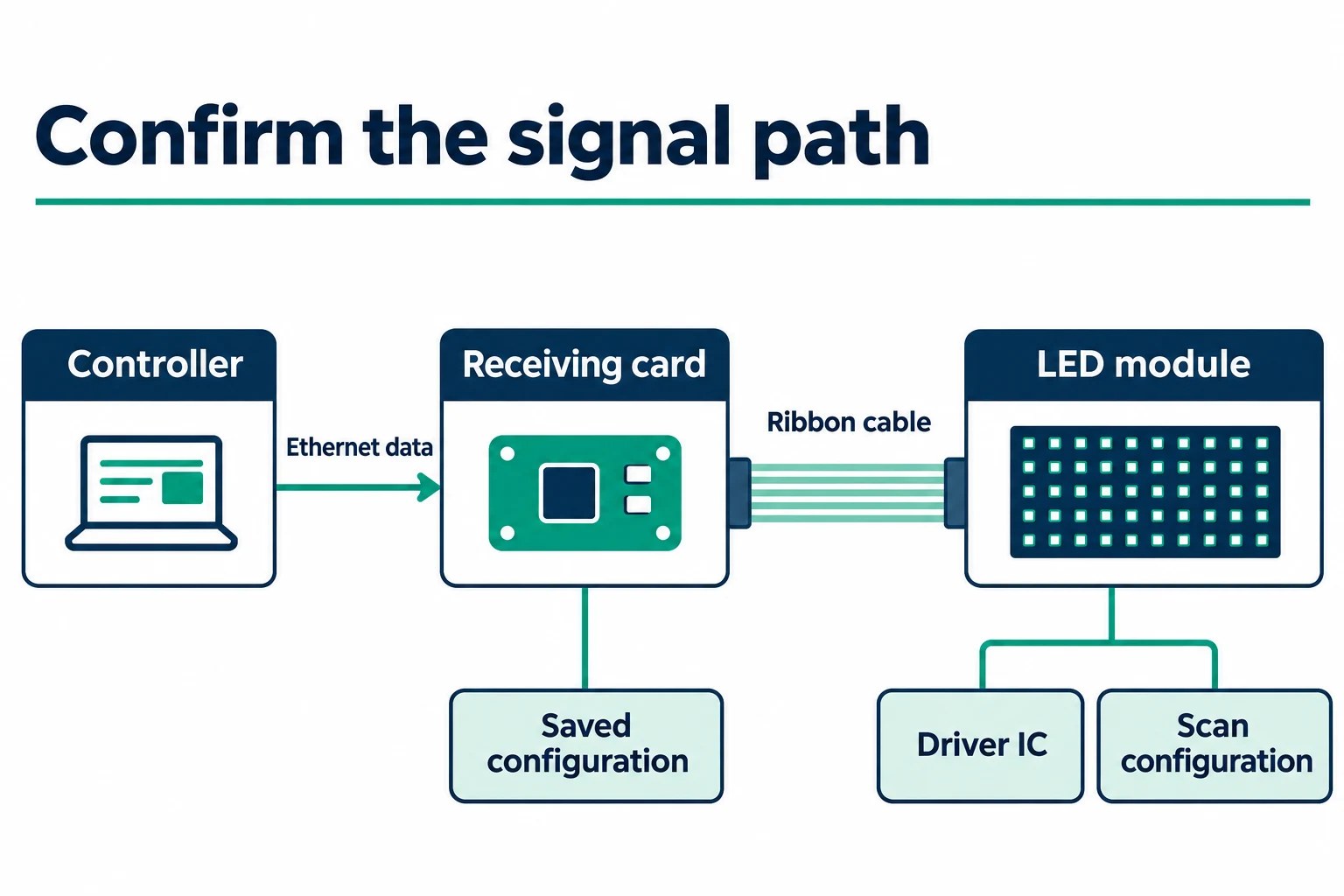
The August 2026 specification revision specifically updates the data-interface diagram. Use that revision during the comparison instead of relying on a saved screenshot from an earlier document. If the cabinet harness is undocumented, ask the cabinet or module supplier to identify its pin assignment before choosing an adapter or connecting a sample.
Record the scan configuration and data-group arrangement together with the driver IC. These details affect the configuration needed to display the module correctly. An IC name is one part of the evidence. It does not establish the complete module wiring, firmware support, or cabinet layout by itself.
Keep the general HUB75E connector guide available for the wider interface discussion. This NovaStar NV7512 compatibility checklist adds a model-specific purchasing decision. The integrator needs confirmation that the offered NV7512, the selected firmware, and the documented module arrangement can operate together under the intended settings.
3. Check loading capacity at the intended source bit depth
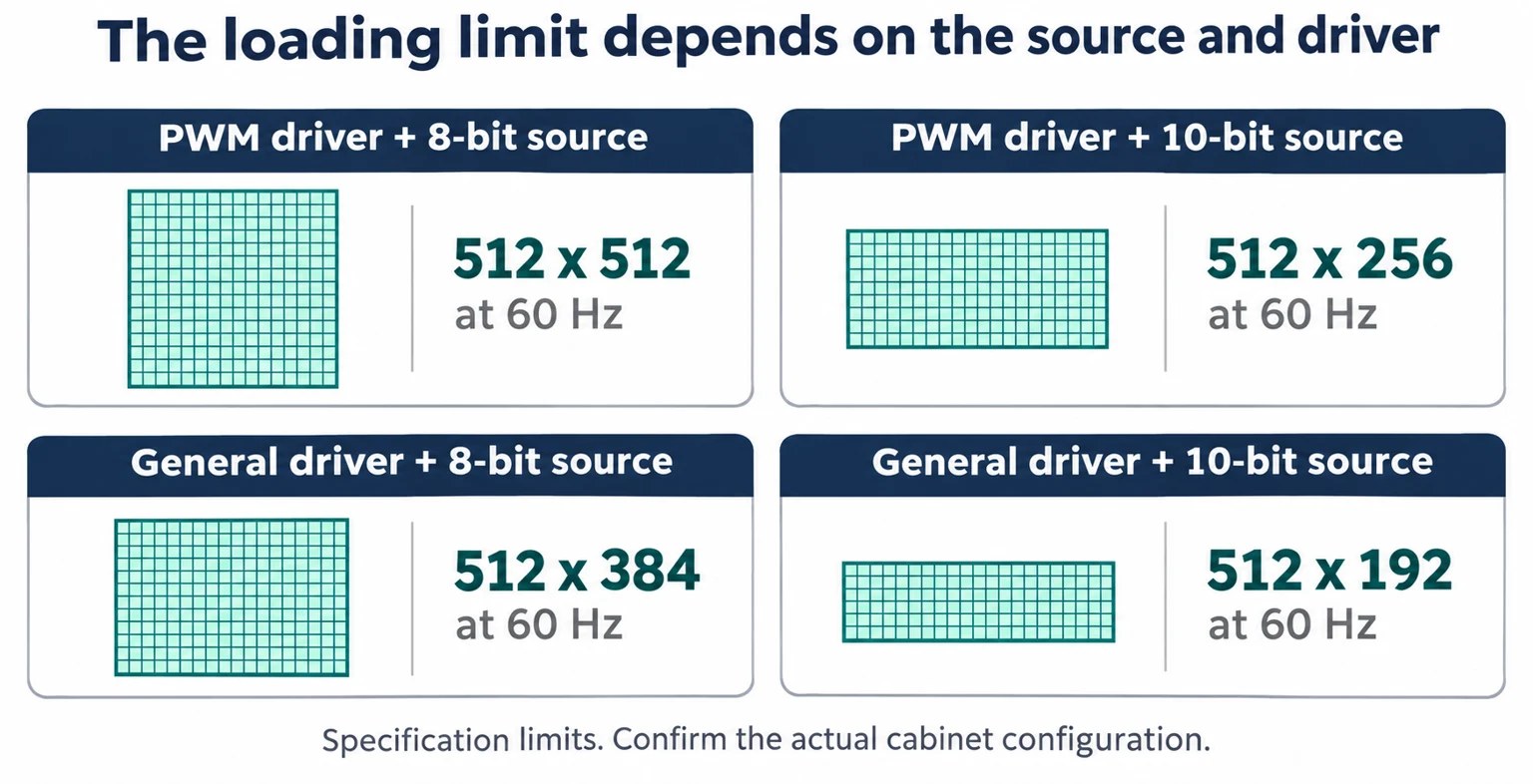
The NV7512 specification gives four maximum loading conditions at 60 Hz. Select the row matching both the module driver category and video-source bit depth. Using the largest number from the table without its conditions can lead to an incorrect card allocation.
| Driver category | Video-source bit depth | Maximum resolution | Purchasing check |
|---|---|---|---|
| PWM driver IC | 8-bit | 512 × 512 pixels | Confirm the module uses this driver category. |
| PWM driver IC | 10-bit | 512 × 256 pixels | Recheck a layout originally planned for 8-bit video. |
| General driver IC | 8-bit | 512 × 384 pixels | Use the general-driver limit for this source depth. |
| General driver IC | 10-bit | 512 × 192 pixels | Validate the narrower loading envelope before ordering. |
Write the actual cabinet width and height in pixels into the NovaStar NV7512 compatibility checklist. Physical size and pixel pitch can help identify a cabinet, but the loading comparison needs pixel dimensions. Record how many modules are connected to each output and how their data groups are arranged across the cabinet.
Consider a hypothetical 512 × 384-pixel cabinet. Its dimensions match the published general-driver, 8-bit condition at 60 Hz. The same dimensions exceed the listed height for the general-driver, 10-bit condition. This calculation shows why a later source-depth requirement can change the receiving-card layout. It is a specification comparison, and the complete configuration still requires verification.
The NovaStar NV7512 compatibility checklist should also identify the sending controller and the intended input settings. Receiving-card capacity and controller Ethernet-port capacity are separate constraints along the same signal path. Confirm the complete allocation instead of assuming that a valid receiving-card layout proves the upstream port has sufficient capacity.
Keep video frame rate and LED refresh rate clearly labeled in the purchasing record. The 60 Hz condition in this loading table describes the published loading condition. It should not be turned into an unsupported promise about the final LED refresh rate, camera performance, or the appearance of a particular driver-IC configuration.
4. Confirm DC power, board clearance, and service access
The published NV7512 input range is DC 3.8–5.5 V. Rated current is 0.5 A and rated power is 2.5 W. NovaStar states that actual current and power can vary with settings, environment, and use. Treat these as card specifications when checking the cabinet power design, and account separately for the LED modules and other loads.
Include the supply arrangement, connection polarity, connector type, and voltage at the planned card location in the NovaStar NV7512 compatibility checklist. A nominal supply label is useful initial information. The person responsible for the cabinet’s electrical design should confirm the actual supply and wiring conditions before connecting the card.
NovaStar lists dimensions of 91.5 × 145.6 × 19.3 mm, approximately 3.60 × 5.73 × 0.76 in. The mechanical notes separately specify a maximum overall thickness of 20.0 mm, approximately 0.79 in. Allow for components on both sides, supporting hardware, cable plugs, bend clearance, and access during service.

For the NovaStar NV7512 compatibility checklist, compare mounting-hole locations and support heights with the actual cabinet. Outer board dimensions alone cannot establish that the mounting points align. The specification recommends contacting NovaStar for a higher-precision structural drawing when designing tooling or installation holes. Obtain that drawing before releasing a custom bracket for production.
The operating range is −20 to +70°C, approximately −4 to +158°F, with 10–90% relative humidity and no condensation. These conditions apply to the card environment. An outdoor enclosure still needs a design that controls water ingress, condensation, heat, and airflow around the electronics. A receiving-card temperature rating does not establish an enclosure protection rating.
5. Prepare the configuration and feature requirements
A NovaStar NV7512 compatibility checklist needs a configuration handover as well as a hardware check. Record the module manufacturer, driver IC, scan arrangement, module resolution, cabinet resolution, controller model, software version, and available receiving-card configuration files. Identify who can validate the proposed firmware and reproduce a working cabinet setup.
The NV7512 supports firmware and configuration readback, along with calibration-coefficient management. Where an existing system remains readable, preserve the relevant files through its supported workflow before changing hardware. Identify each file by cabinet type, original card model, version, and date so the installation team can trace what it belongs to.
Consult the configuration-file compatibility guide when assessing an existing RCFGX file. A saved file is evidence about a particular setup. Its suitability for the offered card and firmware must be established before applying it to the screen. Keep a recoverable copy of the original information and identify the person responsible for the conversion.
Feature requirements belong in the NovaStar NV7512 compatibility checklist because some depend on other equipment. The specification describes receiving-card latency as low as one frame for modules using driver ICs with built-in RAM. It also requires a supporting controller for 3D output. RGB independent gamma adjustment involves a supporting controller and NovaLCT.
For calibration, identify whether the project needs existing coefficients preserved, new measurements, or a confirmed procedure for loading available coefficients. The calibration-coefficient guide covers that handover in more detail. State the required outcome and available files instead of treating a supported feature as proof that the cabinet is already calibrated.
6. Turn the checklist into a sample acceptance record
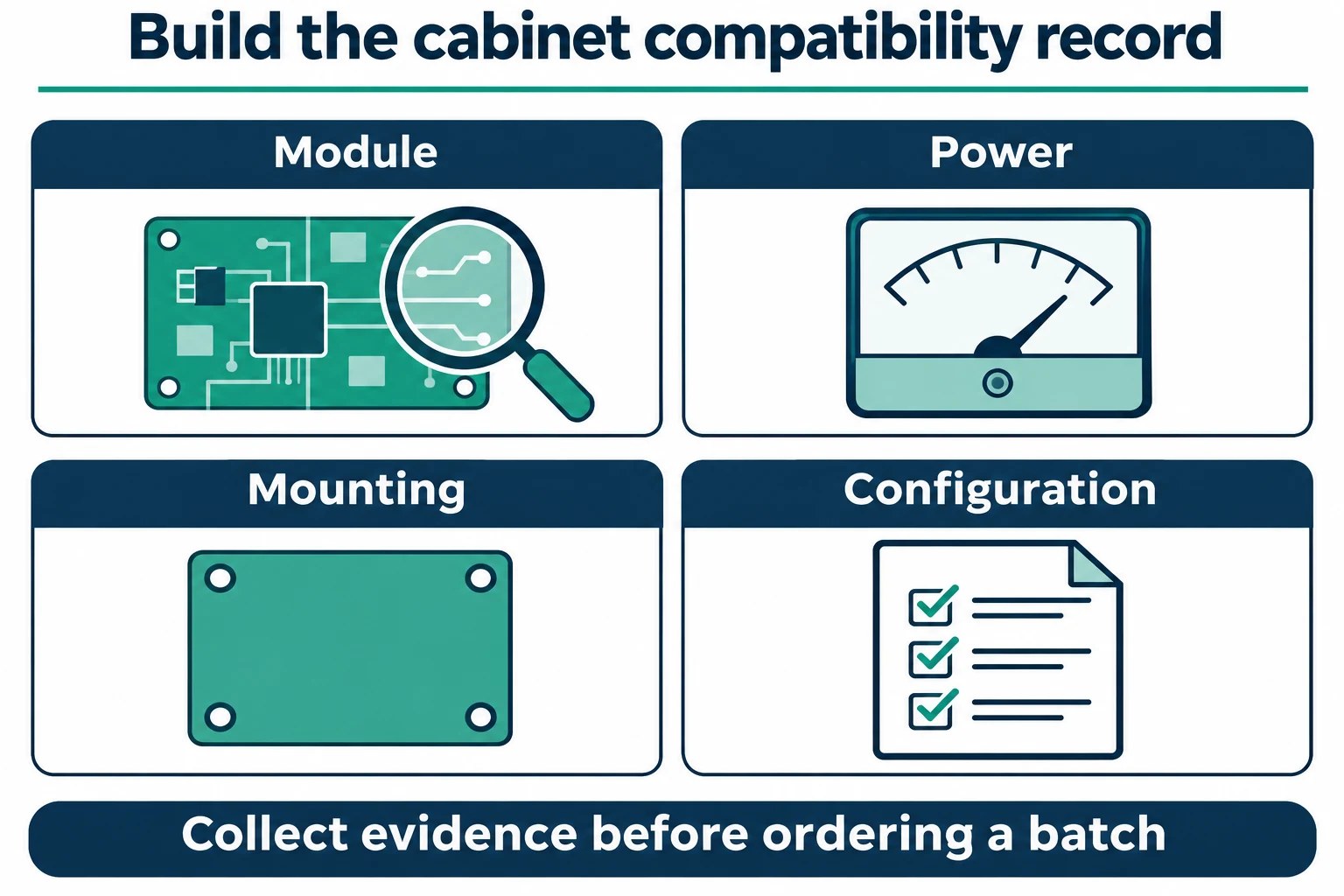
Use one representative cabinet to establish whether the proposed configuration meets the project’s requirements before authorizing a batch. The sample should represent the actual module electronics and wiring. If the screen includes different module batches or cabinet designs, identify which variants require separate checks.
| Decision | Required record | Unresolved result |
|---|---|---|
| Module interface | Driver IC, scan arrangement, connector orientation, current signal drawing | Request the module or cabinet supplier’s confirmation. |
| Loading plan | Cabinet pixel map, source depth, frame rate, data-group allocation | Revise the allocation before accepting the quantity. |
| Physical fit | Mounting drawing, clearances, supply and harness details | Resolve the mounting or wiring change first. |
| Configuration | Identified firmware, software, settings and backup files | Arrange a supported configuration procedure. |
| Acceptance | Documented sample settings, observations and agreed project criteria | Record the discrepancy and retain the original evidence. |
Agree on observable acceptance criteria in advance. Depending on the project, these may include correct pixel mapping, stable color and grayscale under the chosen settings, startup behavior, required source depth, and recovery after the intended signal interruption. Record the settings used for each observation so a later change can be evaluated against the same conditions.
For the NovaStar NV7512 compatibility checklist, keep firmware recovery and signal-path backup as separate requirements. The specification describes dual-program backup and loop backup. Loop backup requires primary and backup lines. Discuss the required wiring and controller behavior when defining a redundancy test, and document what the sample actually demonstrates.
When the sample is accepted, attach its hardware identification, configuration files, wiring record, and agreed criteria to the purchasing documentation. Specify how substitutions or firmware changes will be reviewed. This gives the distributor, integrator, and installation team a common reference when the larger batch arrives.
At incoming inspection, compare the delivered cards with the agreed sample rather than reopening the selection process from memory. Photograph a readable model marking, record any visible revision marking, and check that the supplied quantity and accessories match the purchase documentation. Where the supplier has changed a firmware version, obtain the associated compatibility confirmation before installing the new batch across the screen. Keep an identified sample and its files available to the commissioning team.
Separate a visible display fault from the conclusion that a receiving card is unsuitable. A missing section, incorrect color, or wrong row arrangement is an observation to document with the source, configuration, and wiring in use. It can have several causes. Return that evidence to the responsible technical team so the cause can be investigated. Replacing multiple parts or changing several settings together makes it harder to establish which change corrected the problem.
The NovaStar NV7512 compatibility checklist should name the person approving the sample and the person maintaining its configuration record. A useful acceptance note includes the cabinet identifier, module type, controller, source format, software, firmware, test date, and unresolved exceptions. This avoids an ambiguous message such as “the screen works” becoming the only basis for a substantial order. Keep any acceptance limits specific to the project and supported by the actual observations.
For a maintenance stock order, document how a spare will be prepared when it is needed. Identify where the validated configuration and calibration information are held, who can apply them, and how the replacement cabinet will be checked afterward. Avoid relying on a single unlabelled file on an installation laptop. The available files should be traceable to the card and cabinet variant that was actually accepted.
For a new cabinet design, agree on which party supplies the modules, harness, controller, and card for the sample evaluation. Define the intended operating conditions before the test so each party is evaluating the same setup. If a required feature cannot be demonstrated with the available equipment, keep that requirement open in the acceptance record. Resolve it with the relevant supplier before treating the batch as approved for that feature.
Finally, distinguish technical approval from commercial availability. A validated card configuration helps specify the item, but stock, supplied revision, packing, and delivery arrangements still need confirmation for the actual order. Ask the quotation to identify the model and any agreed configuration work explicitly. This connects the technical record to what will be supplied and gives the receiving team a practical reference for checking the delivery.
Keep a short change log with the approved sample record. If a later module batch, controller setting, or firmware version changes, list the affected cabinets and repeat the relevant checks. This lets the project team assess a specific change against known conditions while keeping the original approval evidence available.
Frequently asked questions
Does the NV7512 need a separate HUB board?
The card has twelve onboard HUB75E module connectors. Whether an existing cabinet needs an adapter depends on its module connector arrangement and wiring. Compare those interfaces directly before deciding which additional hardware, if any, belongs in the order.
Are the two Ethernet sockets a fixed input and output?
NovaStar’s specification describes gigabit Ethernet connections to the sending card and other receiving cards, with either socket usable for input or output. Keep the actual cabinet-chain and backup wiring documented so the installation can be reproduced.
What does the listed 92.1 g weight describe?
The specification identifies 92.1 g as the net weight of one card. Shipping and packed weights can include packaging and other items. Confirm the packing information separately when estimating freight for a batch.
Can the card show an image when the source disappears?
The NV7512 supports stored-image settings for startup, Ethernet disconnection, and absence of a video source. Specify the desired behavior for each condition and include it in sample acceptance if the installation depends on a particular fallback image.
Does a positive sample result cover every cabinet in an existing screen?
It covers the documented sample conditions. Compare the remaining cabinets for differences in modules, driver ICs, wiring, firmware, and layout. Record any variants and decide which require additional validation before treating the sample as representative of the full order.
Prepare an NV7512 compatibility inquiry
Send the completed NovaStar NV7512 compatibility checklist with front and rear module photographs, readable IC markings, cabinet pixel dimensions, the controller model, intended video settings, and available configuration files. Add mounting and power details plus the quantity and whether the order is for a new design or maintenance spares. Ask LED Mall to review the proposed card and cabinet requirements so the quotation can identify the exact hardware and the compatibility points still requiring confirmation.