
NovaStar MRV408-S LED Receiving Card | 8 HUB75E
$ 12.00
NovaStar MRV408-S receiving card with 8 HUB75E connectors and up to 16 parallel RGB data groups. With an 8-bit source at 60 Hz, loading capacity is 512 × 512 pixels for PWM driver ICs or 512 × 384 pixels for common driver ICs.
10000 in stock
NovaStar MRV408-S: 8-HUB75E LED Receiving Card
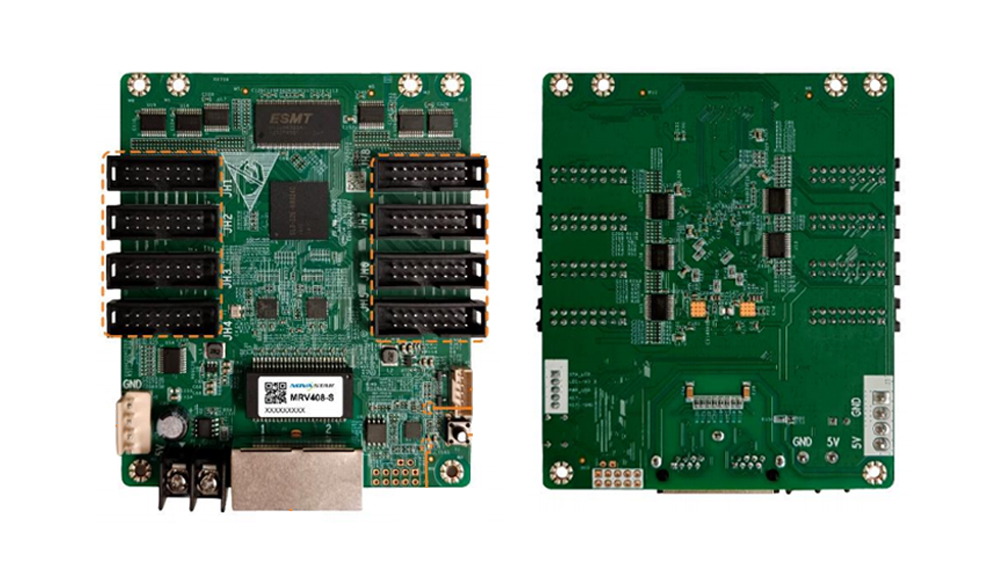
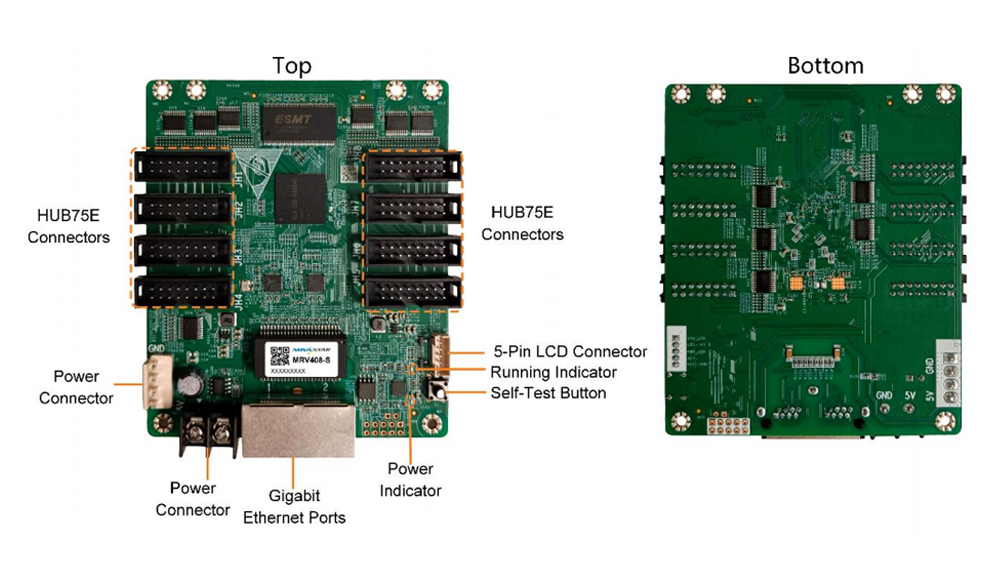
The NovaStar MRV408-S connects LED modules to the display control system through 8 standard HUB75E connectors. It supports up to 16 parallel RGB data groups and provides calibration, cabinet mapping and communication diagnostics for LED display setup and maintenance.
Its loading limit depends on the module driver IC. For an 8-bit video source at 60 Hz, one card supports 512 × 512 pixels with a PWM driver IC or 512 × 384 pixels with a common driver IC.
MRV408-S Technical Parameters
| Parameter | Value |
|---|---|
| HUB75E connectors | 8 standard connectors |
| Parallel RGB data | Up to 16 groups |
| Maximum resolution with PWM driver IC | 512 × 512 at 60 Hz, 8-bit video source |
| Maximum resolution with common driver IC | 512 × 384 at 60 Hz, 8-bit video source |
| Input voltage | DC 3.8 V to 5.5 V |
| Rated current | 0.4 A at 4.2 V |
| Rated power consumption | 1.68 W |
| Operating temperature / humidity | −20°C to +70°C / 10% RH to 90% RH, non-condensing |
| Storage temperature / humidity | −40°C to +85°C / 0% RH to 95% RH, non-condensing |
| Dimensions | 91.6 × 107.5 × 19.3 mm |
| Net weight | 73.7 g per card |
Rated power is a reference value; actual consumption depends on settings, usage and environmental conditions. Use the linked specification to check connector pin definitions and mounting dimensions.
Image Processing and System Requirements
- Color management supports Rec.709, DCI-P3, Rec.2020 and custom gamuts. 18bit+ improves low-brightness grayscale performance.
- Pixel-level brightness and chroma calibration works with NovaStar’s calibration system. Quick seam adjustment and multi-batch adjustment help reduce differences between modules or cabinets.
- Individual RGB gamma adjustment works with NovaLCT and a supporting controller.
- Low latency is enabled by default. Reducing receiving-card latency to one frame requires driver ICs with built-in RAM.
- 3D requires a controller with 3D support. Image rotation in 90° increments is supported; free-angle rotation requires MCTRL R5 and SmartLCT.
- Calibration coefficient management includes upload, readback, saving to hardware and erasure. Uploading can use accelerated transfer where needed.
Cabinet Setup and Fault Diagnosis
Data group mapping shows the position of each group in a cabinet. Mapping 2.0 identifies controllers, Ethernet ports and receiving cards; cabinet resolution mapping supports a minimum of 36 × 20 pixels. Stored-image settings determine what appears at startup or when the input signal or Ethernet connection is lost.
Temperature and voltage monitoring, cabinet LCD support, bit-error detection and Ethernet disconnection detection help with maintenance. Firmware and configuration parameters can be read back to a local computer. Loop backup uses primary and backup line connections, while dual configuration backup and dual program backup provide recovery options.
Product Photo and PDF Specification
Download the NovaStar MRV408-S LED Receiving Card Specification (PDF)
Frequently Asked Questions
How many LED module connectors are on the MRV408-S?
The card has 8 standard HUB75E connectors and supports up to 16 groups of parallel RGB data. Check your module pinout and cabinet wiring against the specification before installation.
Does every MRV408-S setup support 512 × 512 pixels?
No. That maximum applies to a PWM driver IC with an 8-bit video source at 60 Hz. With a common driver IC under the same source conditions, the limit is 512 × 384 pixels.
What are the MRV408-S dimensions and input voltage?
The card measures 91.6 × 107.5 × 19.3 mm and accepts DC 3.8 V to 5.5 V. Its net weight is 73.7 g.
Can the MRV408-S help locate Ethernet communication faults?
Yes. It supports bit-error detection, Ethernet cable disconnection detection and Mapping 2.0 to help identify receiving-card locations and wiring. Temperature and voltage can also be monitored.
How do I display a test pattern on the MRV408-S?
According to the specification, disconnect the Ethernet cable and press the self-test button twice to display the test pattern. Press the button again to switch patterns.
| Weight | 0.5 kg |
|---|
Be the first to review “NovaStar MRV408-S LED Receiving Card | 8 HUB75E”
You must be logged in to post a review.
Will I be charged with customs and taxes?
The prices displayed on our site are tax-free (in US Dollars), which means you may be required to pay import duties and taxes once you receive your order. Import taxes, duties, and related customs fees will be determined by your local customs office when your order arrives at its final destination.
Please note that these additional charges and taxes are your responsibility, and we do not take any responsibility for them. We are not liable for paying or reimbursing any customs duties, taxes, or related fees. For more details on these charges, please contact your local customs office.
Shipping
We can ship to virtually any address in the world. Note that there are restrictions on some products, and some products cannot be shipped to international destinations..
When you place an order, we will estimate shipping and delivery dates for you based on the availability of your items and the shipping options you choose. Depending on the shipping provider you choose, shipping date estimates may appear on the shipping quotes page.
Please also note that the shipping rates for many items we sell are weight-based. The weight of any such item can be found on its detail page. To reflect the policies of the shipping companies we use, all weights will be rounded up to the next full pound..
Returns Policy
You may return most new, unopened items within 30 days of delivery for a full refund. We'll also pay the return shipping costs if the return is a result of our error (you received an incorrect or defective item, etc.)..
You should expect to receive your refund within four weeks of giving your package to the return shipper, however, in many cases you will receive a refund more quickly. This time period includes the transit time for us to receive your return from the shipper (5 to 10 business days), the time it takes us to process your return once we receive it (3 to 5 business days), and the time it takes your bank to process our refund request (5 to 10 business days).
If you need to return an item, simply login to your account, view the order using the "Complete Orders" link under the My Account menu and click the Return Item(s) button. We'll notify you via e-mail of your refund once we've received and processed the returned item..
Related products


Reviews
There are no reviews yet.