
LEDMall Blog
NovaStar TB60 Network Ports: LED OUT vs ETHERNET
Nov
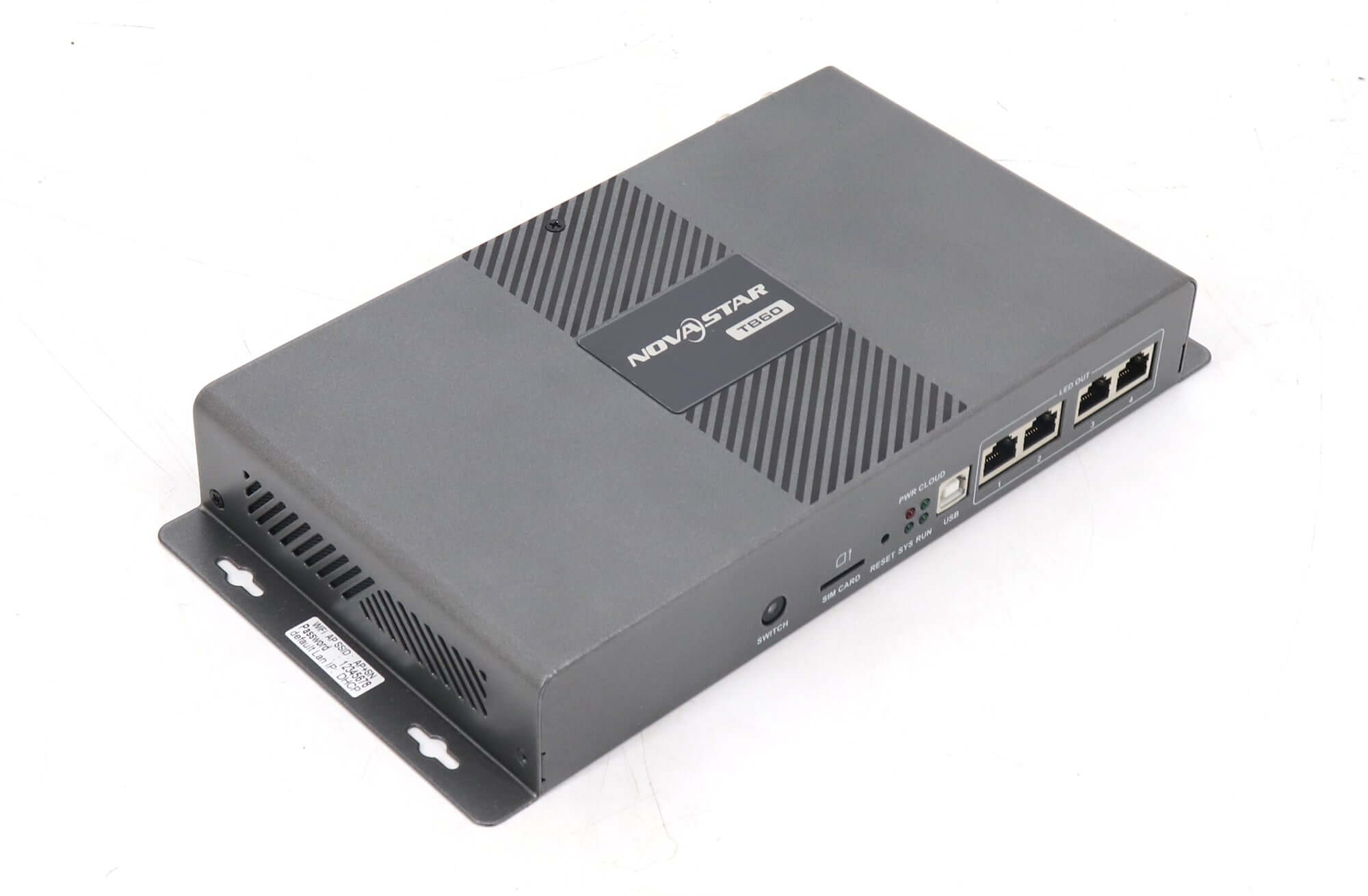
The TB60 network ports serve two different jobs. The four front-panel LED OUT sockets send display data toward receiving cards. The separate rear-panel ETHERNET socket connects the player to a control computer or network for publishing and control. Identify the printed connector label before deciding where a cable belongs.
This explanation is for an AV integrator specifying a fixed advertising display with remote content updates. It uses NovaStar’s TB60 Multimedia Player Specifications V1.2.2, released August 29, 2025. Product photographs identify the physical equipment; the offered hardware and firmware still need to match the documentation used for the project.
Which TB60 network ports connect to the LED cabinets?
LED OUT identifies the display-data connections. ETHERNET identifies the management connection. Their similar socket shape does not establish an interchangeable function. A drawing of TB60 network ports should preserve those names instead of describing every connection as a network cable.
Start with the actual NovaStar TB60 product and inspect both panels. Trace each proposed lead to its destination. For a display-data lead, name the receiving-card chain it serves. For the management lead, name the computer or network connection. These endpoint descriptions make the drawing useful to someone who did not prepare the quotation.
| Connection | Documented role | Project record |
|---|---|---|
| LED OUT 1–4 | Gigabit Ethernet display outputs | Output number, cabinet group and receiver order |
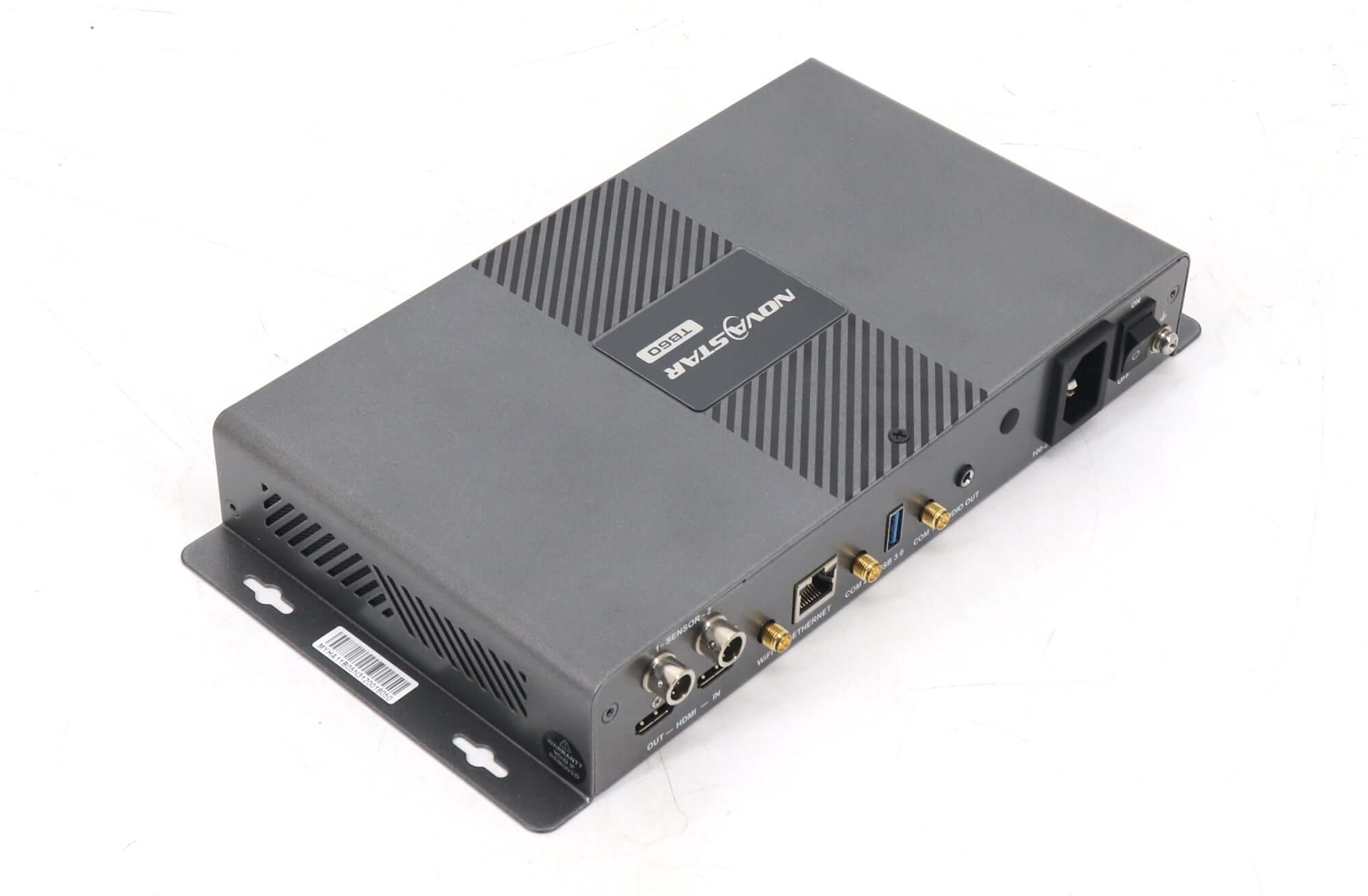
| Rear ETHERNET | Computer or network connection for publishing and control | Management endpoint and responsible network owner |
| Wi-Fi | Local player hotspot or connection through a router | Approved access method and site network requirement |
| Optional cellular route | Requires separately purchased supporting hardware | Confirmed module, service and destination-site acceptance test |
When reviewing TB60 network ports, keep a successful management connection separate from a successful cabinet connection. A computer reaching the player establishes one part of the installation. It does not demonstrate the receiver order, the screen allocation, or the image shown on the wall.
Choose a management connection that fits the site
Plan management access to the TB60 network ports around the content operator’s location and the site’s available infrastructure. A technician standing beside the display and an operator updating several branches have different access requirements. Ask who will publish content, from where, and who will maintain that access after handover.
The cited specification describes Wi-Fi AP access through the player’s hotspot and Wi-Fi STA access through a router. It also describes using AP and STA together. Confirm the supported arrangement on the supplied unit. A local connection alone should not be accepted as proof that the intended remote publishing service is reachable.
The TB60 network ports should therefore be described alongside the network service, rather than as a replacement for it. If the project uses a site LAN, identify its owner and the process for approving the player. If it uses wireless access, confirm the permitted network and credentials through the site’s normal secure handover process. Keep credentials out of the public drawing and quotation.
For cellular operation, a SIM slot or antenna connection is not a complete equipment list. V1.2.2 states that the player ships without the optional 4G module. Ask the supplier to identify the proposed module and what is included. Have the project team confirm the service and operation at the destination before relying on it for scheduled updates.
Do not assume that a description written for another Taurus model or an older document applies unchanged. Retain the exact document version beside the offered equipment identification. If the supplier proposes a substitution, compare the required publishing workflow and physical connections before accepting it as equivalent.
Give each cable a destination and an owner
A useful drawing for TB60 network ports records the entire route. “Ethernet to screen” is too vague for a handover where several similar cables leave the same enclosure. Use the printed port name at the player end and an identifiable endpoint at the other end.
For example, a hypothetical retail installation could label one management lead “TB60 rear ETHERNET to approved store network connection” and a separate display lead “TB60 LED OUT 1 to first receiver in cabinet group A.” These are planning examples, not an approved wiring design. The installer must replace the generic endpoint names with the actual project references.
Add ownership to those records. The AV team may maintain the cabinet map while the customer’s network team maintains the management connection. The content operator needs to know which team can investigate a failed update. Defining those responsibilities before installation avoids changing screen wiring to investigate an unrelated access problem.
Keep the receiving-card configuration record with the cabinet information. That record serves a different purpose from the network access details. Retaining both makes a future service visit more precise without treating a software file as proof of every physical connection.
Test content delivery and the displayed result separately
Acceptance of TB60 network ports should include an update sent through the connection the customer will actually use. A demonstration from a technician’s temporary connection does not establish the permanent site’s operating workflow. Record the source computer or operator location and the route used for the demonstration.
Choose a clearly identifiable test program and confirm it on the intended screen. Record the program name, the player identification and the observed result. If the publishing interface reports a successful transfer, also inspect the wall. A transfer message and the correct visible content are separate observations.
Include a restart check using the project’s approved procedure, then confirm that staff can restore normal operation. Retain the accepted configuration and identify who holds the recovery information. This is a proposed commissioning record; it is not a claim that LED Mall has tested a particular customer’s installation.
If an update fails, compare the failing step with the last successful observation. Can the operator reach the player? Was the intended program delivered? Is the expected source active? Is the wall displaying it correctly? Keeping those questions separate helps the service team request relevant evidence instead of changing several unrelated settings at once.
The final TB60 network ports review should leave a readable connection drawing and an accepted update procedure. Ask for unresolved network, module or configuration questions to remain visible in the handover notes. A finished-looking diagram should not conceal an untested route.
Frequently asked questions
Does using Wi-Fi remove the cabinet data cables?
The documented wireless function provides management access to the player. Specify the display-data route to the receiving cards separately. Do not interpret a wireless publishing arrangement as approval for a wireless cabinet connection.
Should a technician factory-reset the player when its connection is unclear?
First identify the existing configuration and retain the available recovery records. A factory reset is a separate service decision that can affect a working setup. Have the responsible integrator establish an appropriate recovery plan before using it as a troubleshooting step.
What information helps when a replacement laptop cannot find the player?
Provide the laptop’s connection method, the intended player identity, the site network arrangement and the software version in use. Record whether the previous computer still works. Those details help distinguish a changed management environment from a change to the screen-side hardware.
Request a connection review before ordering
Send the screen map, photographs of both player panels, proposed management connection and the operator’s update location. Include the required network or cellular accessories and the hardware identification already available. Ask LED Mall to review the TB60 network ports and equipment requirements, including current availability and the supplied revision, before treating the proposed route as ready for installation.