
LEDMall-Blog
CMS260 Mac Control: Check the V-Can Connection First
November
CMS260 Mac control needs a model-specific connection check. NovaStar’s V-Can V3.8.0 manual states that, on macOS, the CMS260 does not support a direct connection to the computer’s Ethernet port. A general claim that the software supports Mac does not approve that particular cable route.
For an AV integrator installing a CMS260 where staff will use an existing Mac, the purchase should include a demonstrated control arrangement. Identify the computer, software, controller and connection accessories together. Showing a presentation on the LED wall and operating the controller from software are separate acceptance items.
This explanation uses the V-Can V3.8.0 manual and the manufacturer CMS260 specification supplied with the LED Mall listing. The software revision supplies the Mac-specific restriction; the hardware document identifies the connectors. The examples below are hypothetical purchase reviews, rather than reports of tests on a particular Mac or controller.
1. Identify the proposed CMS260 Mac control setup
The V-Can V3.8.0 operating-environment section lists macOS 12.0 or later. Record that requirement alongside the exact Mac model, macOS version and proposed application version. An operating-system minimum is one part of the review; it does not identify every computer, adapter or connection combination that a supplier has verified.
The V3.8.0 release notes, dated November 22, 2024, list the addition of CMS260 support and identify CMS260 device program V1.0.0. They also record a fix for an installation problem on macOS 15.0 and later. Keep that installation fix separate from the manual’s connection restriction. It does not establish that a direct Ethernet route or every newer computer arrangement is supported.
Ask the supplier to describe the supported CMS260 Mac control arrangement for the offered controller. If the proposed laptop uses USB-C, include any cable, dock or adapter between the computer and controller. A quote that names only a generic adapter leaves the actual connection accessory undefined.
Keep a record of the exact items used in the supplier’s demonstration. If your staff must bring their own computer, arrange the review around that computer or document which difference still needs verification. A demonstration on an unspecified laptop leaves purchasing unable to compare it with the equipment available at the installation.
For a hypothetical meeting-room installation, the buyer may already own the Mac and need only a controller and connection accessories. The supplier should state whether the quoted scope includes application setup, a verified cable arrangement and staff handover. Those services should be visible alongside the hardware list, with any remaining compatibility question assigned to an owner.
2. Separate video, control and screen data
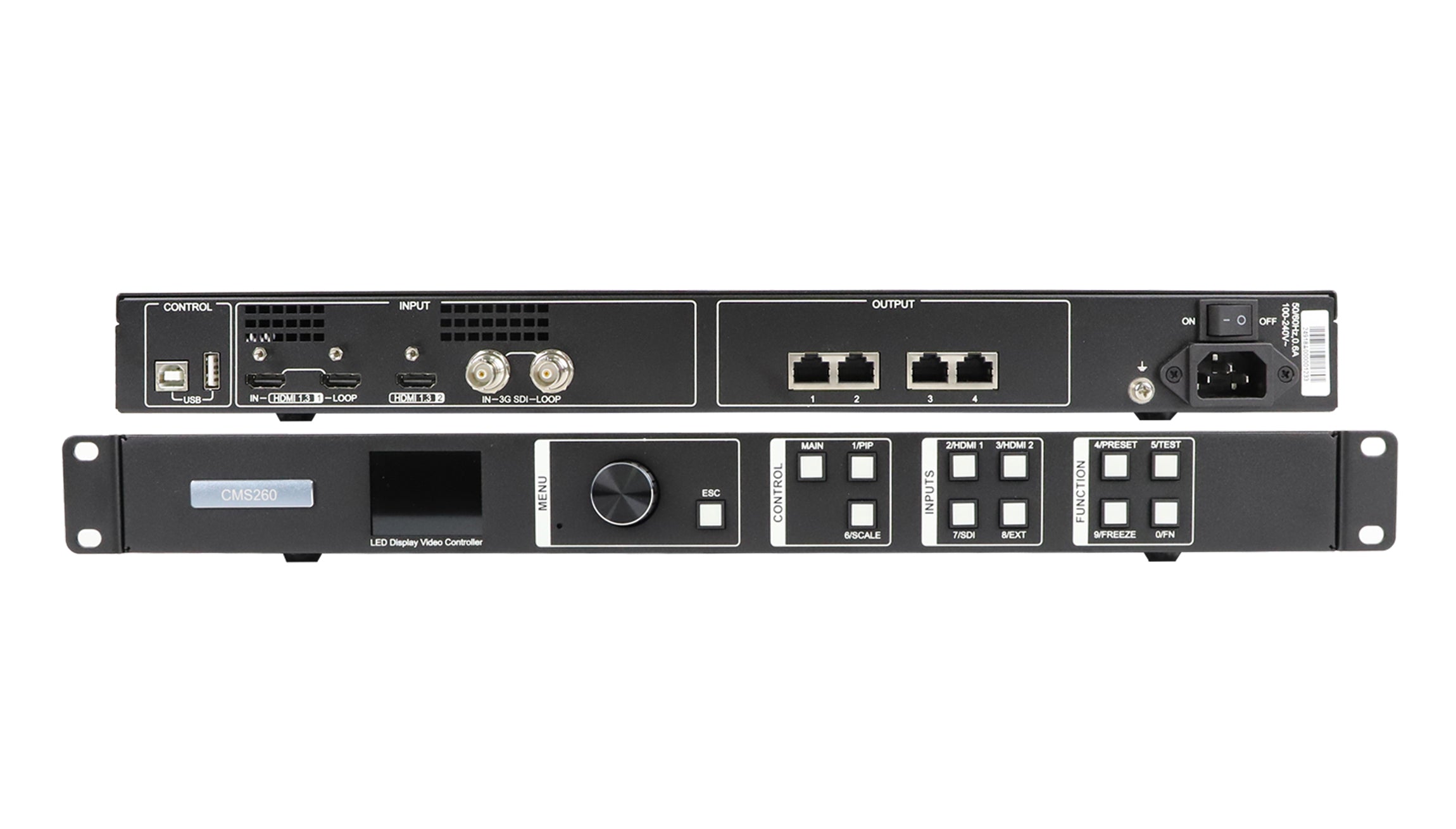
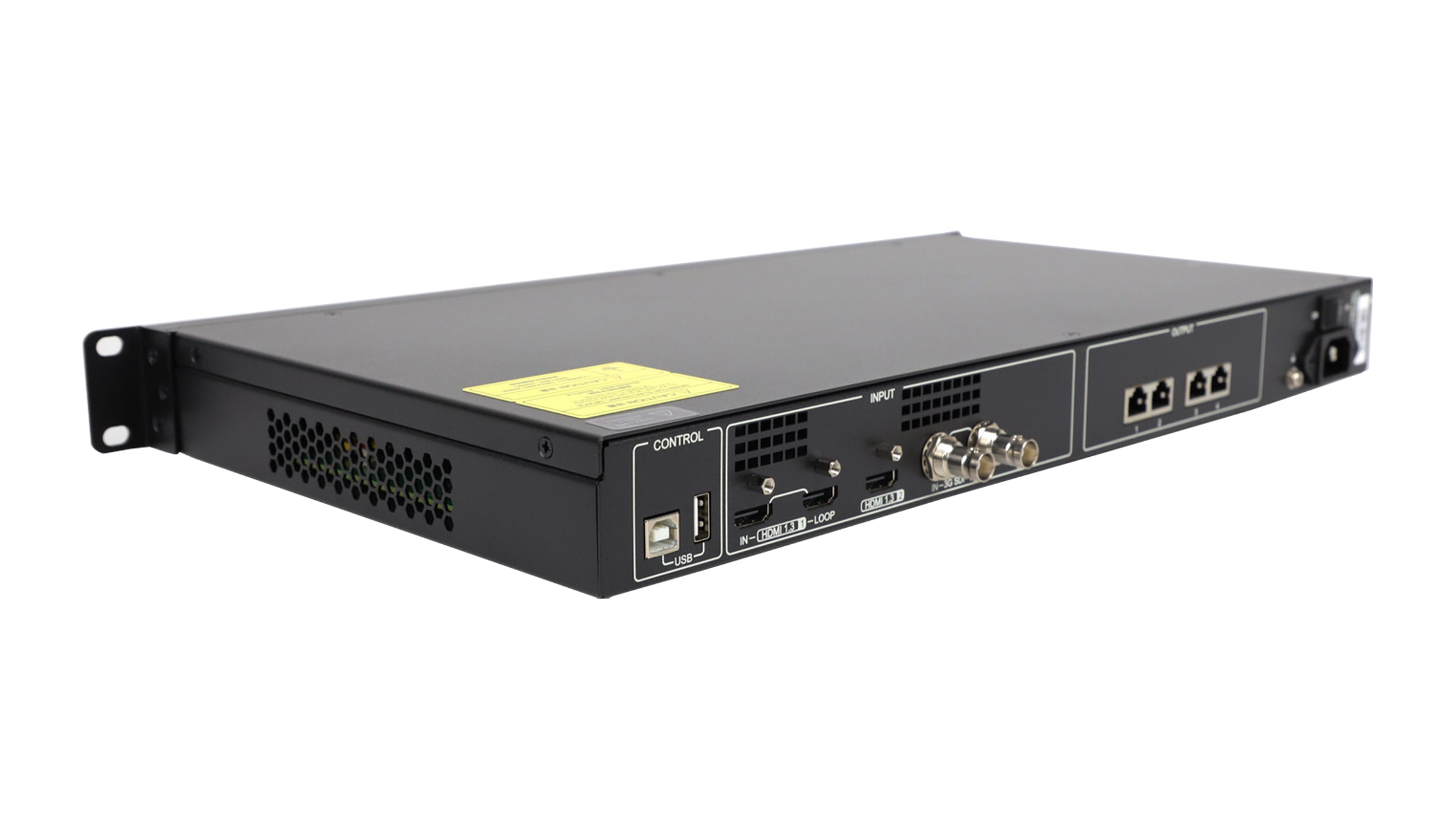
CMS260 Mac control uses a different task description from sending the Mac’s presentation picture to the controller. The retained hardware specification identifies USB Type-B for connection to the control computer and as a cascade input; Type-A serves as a cascade output. Its four Gigabit Ethernet connectors are LED screen-data outputs.
Das CMS260 product reference helps identify the controller being quoted. Put the printed connector label beside each route in the equipment schedule. This gives the installer a usable endpoint description rather than relying on the shape of a socket or the color of a cable.
| Anforderung | Path to identify | Was der Käufer behalten sollte |
|---|---|---|
| Presentation picture | Video source to the selected controller input | Source format and the accepted visible result |
| Computersteuerung | Computer through the approved control connection | Mac and software identity, cable arrangement and demonstrated operation |
| LED screen data | Numbered output to the specified receiving-card chain | Cabinet/output map matched to the installed screen |
| Controller cascading | The designated cascade input and output | Each controller identity and the approved connection drawing |
A successful picture test does not complete the CMS260 Mac control check. Ask for evidence of the software recognizing and operating the intended controller as well as evidence that the desired video reaches the screen. Keeping those results separate helps locate an unfinished requirement without treating every connection issue as the same fault.
3. Check the required software functions by model
V-Can serves several NovaStar product families, and its manual states that the interface and functions vary with the connected device. Its input-color section explicitly includes CMS260. Other sections have their own applicability lists. A screenshot from a different controller is therefore an incomplete specification for the controls your staff will receive.
Define CMS260 Mac control through the tasks staff actually need. For example, an integrator may require a particular source adjustment during setup and a simple daily operating task afterward. Name those tasks in the purchase request, then ask the supplier to demonstrate the available controls on the proposed controller and software combination.
Do not turn a missing menu into an instruction to copy a procedure from another model. Ask which supported method applies to the requested function. The answer may belong in a commissioning or front-panel workflow rather than in the daily Mac operating procedure; the supplier needs to identify that division clearly.
For a quotation comparison, separate delivery of the controller from delivery of an operating workflow. One offer may include a confirmed software connection and a short staff procedure, while another supplies only hardware. Ask what the integrator will verify, what records will be handed over and who will answer an unresolved software question. This avoids assuming that equal equipment names mean equal installation scope.
Das CMS130 and CMS260 comparison addresses the broader hardware shortlist. Once CMS260 is selected, a control demonstration should address that unit. A feature shown on another model can be useful background, but it should remain separate from the accepted functions of this purchase.
4. Agree a practical handover test
Make CMS260 Mac control an explicit acceptance line. Retain the Mac model, macOS version, application version, controller identity and relevant firmware information, followed by the actual cable and adapter list. Attach the operating tasks agreed for staff and the result of each demonstration.
A useful hypothetical handover starts with the intended controller identified in software, then checks a small agreed control change in a prepared demonstration setup. Record the visible result and return to the agreed operating state. Have the responsible integrator choose an appropriate test so the buyer does not approve a task that was never demonstrated.
Retain exceptions with the CMS260 Mac control result. If a temporary dock was used, a staff computer was absent or one required task could not be shown, identify the missing check. A short exception list makes the approval boundary useful when someone later compares the delivered package with the quotation.
Plan how the arrangement will be supported after handover. Keep the accepted software version and accessory identities accessible to the installation team. If the Mac, operating system or connection hardware changes, compare that change with the accepted record and obtain confirmation for the affected part of the workflow before assuming the earlier result still applies.
Häufig gestellte Fragen
Does a USB-C Ethernet adapter remove the direct-Ethernet restriction?
Do not treat an adapter purchase as proof that the documented Mac restriction has been removed. Request a supported connection proposal for the actual controller and computer, with evidence for that complete arrangement.
Can the same Mac provide the presentation and control functions?
If that is required, specify both tasks and their connections in the request. Have the supplier demonstrate the combined intended workflow. Approval of one task alone does not establish the other or confirm every accessory the computer will need.
Does this control check approve the LED screen’s cabinet configuration?
No. Software communication and cabinet mapping are different acceptance items. Retain the required receiving-card configuration and output map with the screen installation records; a successful CMS260 Mac control demonstration does not replace that work.
Request a control-connection review
Send the Mac model, macOS version, required control tasks, controller identification and any existing cables or adapters. Include the intended presentation source as a separate item. Ask LED Mall to review the proposed CMS260 Mac control arrangement so the supported connection and remaining handover checks are clear before ordering.