

LEDMall Blog
Kan een 5V-voeding een 4.5V-voeding voor een LED vervangen?
november
Keep the specified 4.5V LED power supply unless the cabinet maker has approved the exact replacement. A 5V model is worth considering only if its output stays within the limits of every device fed by that DC branch. Before you order, check how much current the unit can deliver inside the cabinet and whether it matches the AC feed, wiring and cooling. If you can still buy the approved part, order it by its full model number.
Suppose the technician finds 4.5V at a module. Does that settle which spare to buy? Ask where the reading was taken, what the display was doing at the time and what the original supply’s label says. That gives you a starting point for a conversation with the cabinet maker. Leave fault diagnosis, mains work and acceptance testing to a qualified technician.
Identify the 4.5V LED power supply and its branch
Read the nameplate and cabinet record together
Start with a clear photo of the supply label and note the cabinet ID and hardware revision. Check the supplier and full part number, including the suffix, against the manufacturer’s parts list or the last approved repair. A wall can accumulate several cabinet revisions over years of service. If the fitted unit differs from the listed part, give the cabinet maker both records before asking a vendor to quote.
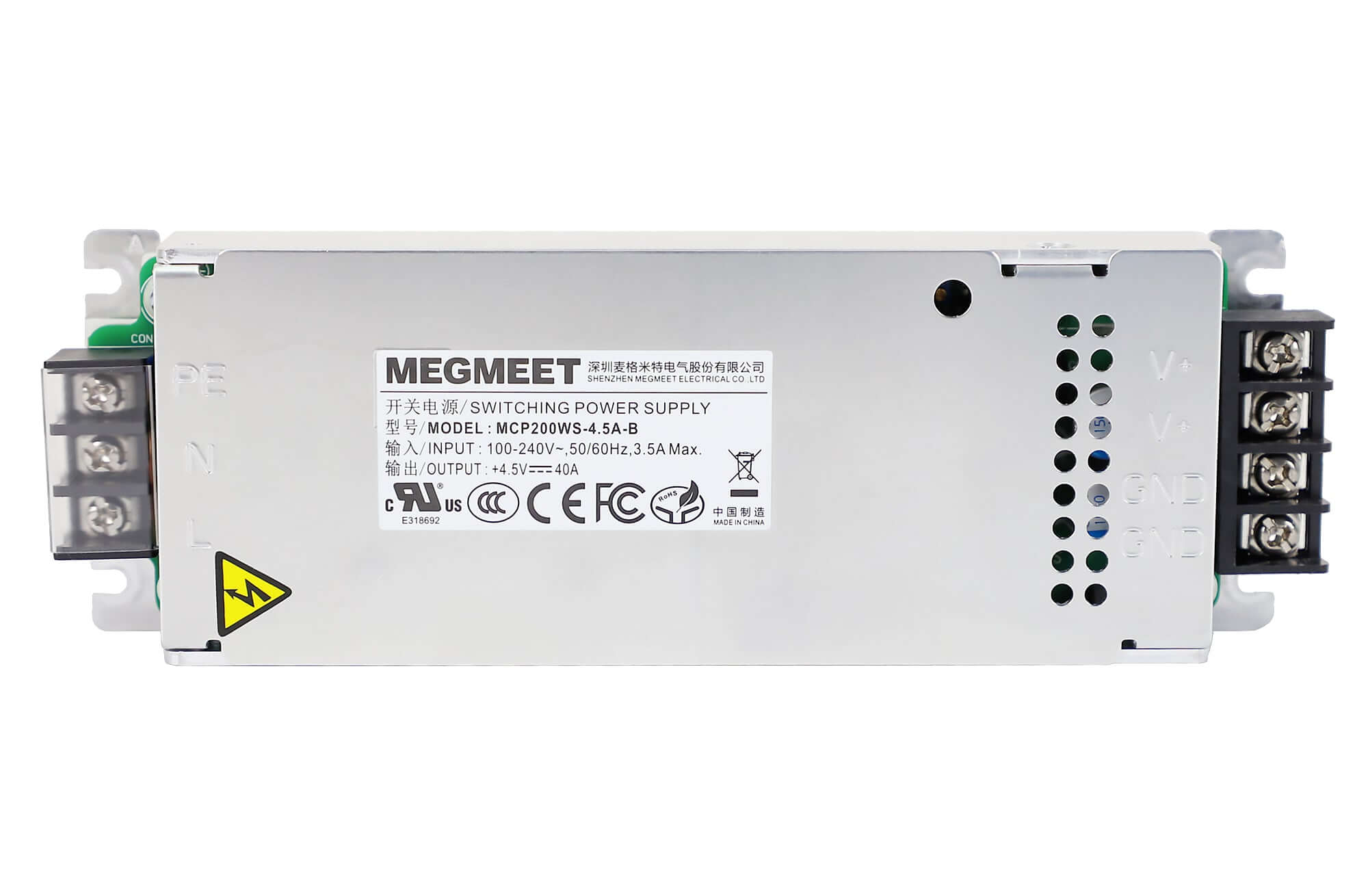
De Megmeet MCP200WS-4.5A-B listing names a unit whose manufacturer specification identifies +4.5V DC as the nominal output. If another cabinet in the wall uses a similar enclosure with a different suffix, give each part its own order line. A shared family name makes spare parts easier to locate, but the complete suffix establishes which item the vendor is quoting.
What does the supply actually feed?
Ask the technician for a branch diagram or a list of the devices fed by this supply. Separate the modules, receiving card and accessories on that branch from anything with its own feed. Check the allowed voltage for each device. A receiving card rated for 5V tells you that the card can accept it. You still need the rating for every module and accessory that shares its supply.
Log the supply’s specified output and the permitted range at the loads as separate fields. If the technician measured voltage at a module or another point inside the cabinet, save the reading alongside the test conditions and connector location. The supplier needs those details to judge whether the observed voltage was in range where it mattered.
A cabinet drawing can also tell you why two identical supplies serve different loads. Say positions A and B each power a group of modules, and only position A also feeds the receiving card. The supply in position B then has a different load to support even if the two labels are identical. Include the failed position and the cabinet revision so the vendor can check the spare against the right loads.
Compare allowed voltage with delivered voltage
Keep three voltage figures on the job sheet
The nominal voltage is the model’s rated output. The load’s permitted range comes from the cabinet and component specifications. The measured voltage belongs with the point and conditions of the service test. The three fields give the vendor a way to compare the part you need with the symptoms the technician saw.
Take a cabinet specified for a 5V supply, with 4.5V recorded at one module. The difference could come from voltage drop in the wiring, a heavier-than-usual load or another fault. Alongside the reading, share the nameplate, test location and operating conditions. Use the cabinet’s documented design or an approved change as the basis for the order.
Screen the candidate against the narrowest limit
Say all the devices on a hypothetical branch can accept 4.30–4.75V. A 5V unit running at 5.00V already exceeds the upper limit. Take a 4.50V source with ±5% static tolerance as another example. Its output could fall anywhere from 4.275V to 4.725V at the specified measurement point. The low end is 0.025V below the permitted minimum even before any further drop along the branch. Get the verified output range and the cabinet’s acceptance limits before you buy.
Now suppose the technician expects a 0.10V drop between the supply and the farthest module at sustained design current. If the supply is guaranteed to deliver at least 4.48V under those conditions, the estimate at that module is 4.38V. Compare it with the device’s minimum and have the technician review startup separately. The drop can be smaller at light load, so use the relevant conditions for the minimum and maximum checks.
| Beschikbaar bewijsmateriaal | Koopbeslissing | Wat moet ik vervolgens bevestigen? |
|---|---|---|
| Nameplate and cabinet record agree on a 4.5V LED power supply. | Request the documented SKU and cabinet revision. | Vendor confirms the part and full suffix in the quote. |
| Reading is 4.5V, while the installed supply is identified as 5V. | Keep the diagnosis open and use the cabinet record to identify the spare. | Technician explains the test location, conditions and reason for the reading. |
| One device’s permitted upper limit is below the candidate output. | Reject the candidate at that operating setting. | Supplier proposes an approved unit or the cabinet maker documents a revised design. |
| The candidate has 4.5V within its advertised adjustment range. | Treat it as a candidate only after cabinet approval. | Written output limits at the intended setting, usable current and a cabinet acceptance record. |
Budget current at the installed conditions
Read the current and power ratings together
The Megmeet MCP200WS-4.5A-B specification lists +4.5V with ±5% regulation and 40A in its output table. Elsewhere it lists 168W as normal output power and provides derating guidance for input and temperature. On paper, 4.5V × 40A equals 180W. If the order hinges on being able to supply that much continuously, show the supplier both entries. Ask them to confirm what the exact model can deliver at the cabinet’s input, temperature and mounting conditions.
Derating is the reduction in usable output that a manufacturer specifies under certain conditions. The datasheet may express it as a percentage of current, a percentage of power or an absolute limit. Check what the curve measures before applying a percentage. If more than one limit applies, use the manufacturer’s instructions or ask which limit governs the proposed installation.
What does the branch draw?
Suppose the cabinet drawing and module data support this example for one branch. It feeds six modules at 4.2A each, a 0.8A receiving card and a 0.6A accessory. Together they draw 26.6A, or about 120W at a nominal 4.5V. Those figures are illustrative. For the cabinet you’re buying for, check the current of each module at the intended brightness and display condition before you add it to the total.
In the same example, a 40A unit rated for 70% output current in the installed conditions could deliver 28A. That leaves 1.4A above the estimated load. If the cabinet requires 10% headroom over 26.6A, you need about 29.3A and the candidate falls short. Use the actual derating curve and specified margin for your order. Check the wattage limit and startup behavior separately if the manufacturer specifies them.
Ask the technician what the branch draws in sustained operation and what happens at startup. Record the air temperature around the unit inside the enclosure, along with the AC feed range, mounting orientation, cooling and any altitude limits in the datasheet. If the paperwork leaves an installed condition unresolved, ask the cabinet maker to review it before you release the spare order.
Check the candidate’s input and fit
Use exact specifications for the AC input
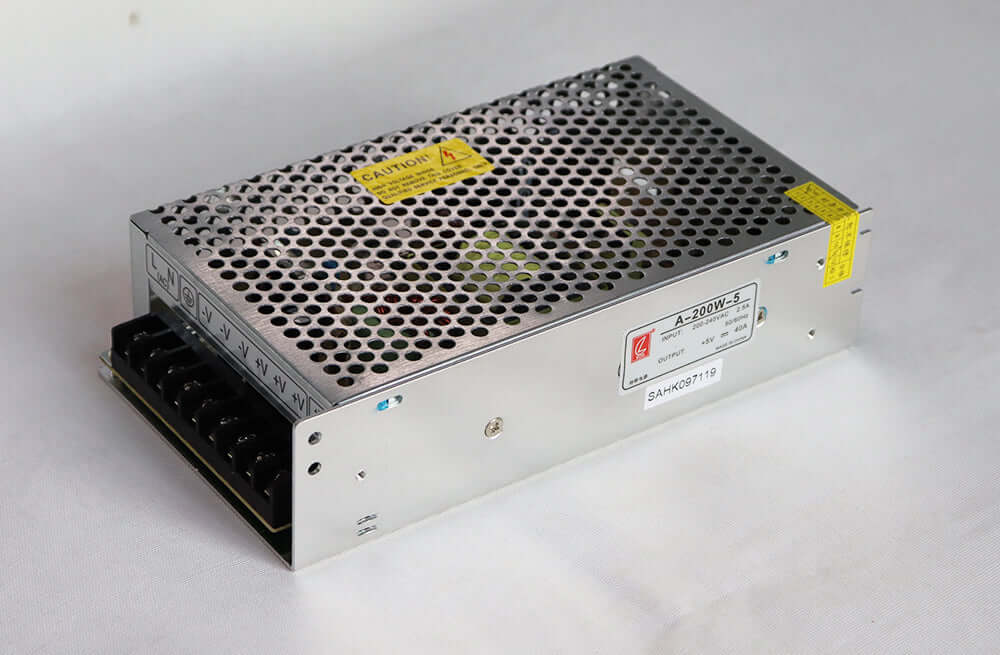
De A-200W-5 product listing specifies 5V output and a 176–264VAC input range. A site whose documentation specifies a nominal 120VAC feed is outside that range. Confirm the installed equipment’s feed and share the actual electrical specification with the supplier. Location alone does not identify which voltage reaches the cabinet.
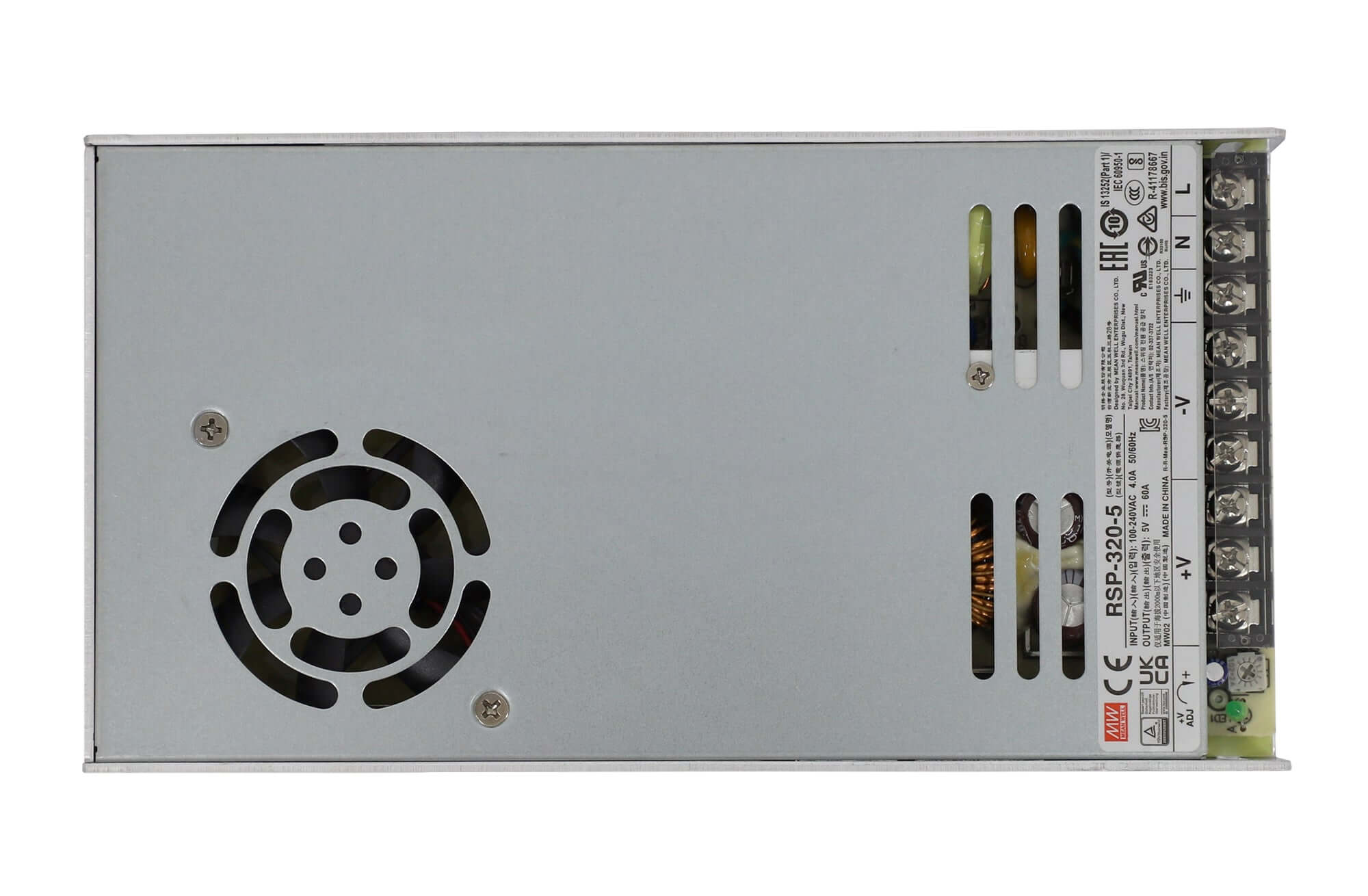
The Mean Well datasheet puts 4.5V at the low end of the RSP-320-5 adjustable range. It also specifies rated conditions, tolerance and low-input derating. Ask the cabinet maker to confirm in writing whether that setting is approved and what output to expect under the conditions inside the cabinet. Leave integration and testing to the qualified technician.
| Exact model | Published field to check | Effect on purchasing |
|---|---|---|
| Megmeet MCP200WS-4.5AB | 4.5V nominal, 90–264VAC per manufacturer specification. Separate current and normal-power entries. | Confirm available continuous output and approved mounting for the original application. |
| A-200W-5 | 5V and 40A, with the store listing specifying 176–264VAC. | Exclude it on a documented 120VAC feed and verify cabinet compatibility elsewhere. |
| Mean Well RSP-320-5 | 5V, 60A, 300W rated. Manufacturer lists 88–264VAC and notes low-input derating. | Compare the actual usable output and mounting drawing when the part is in the approved scope. |
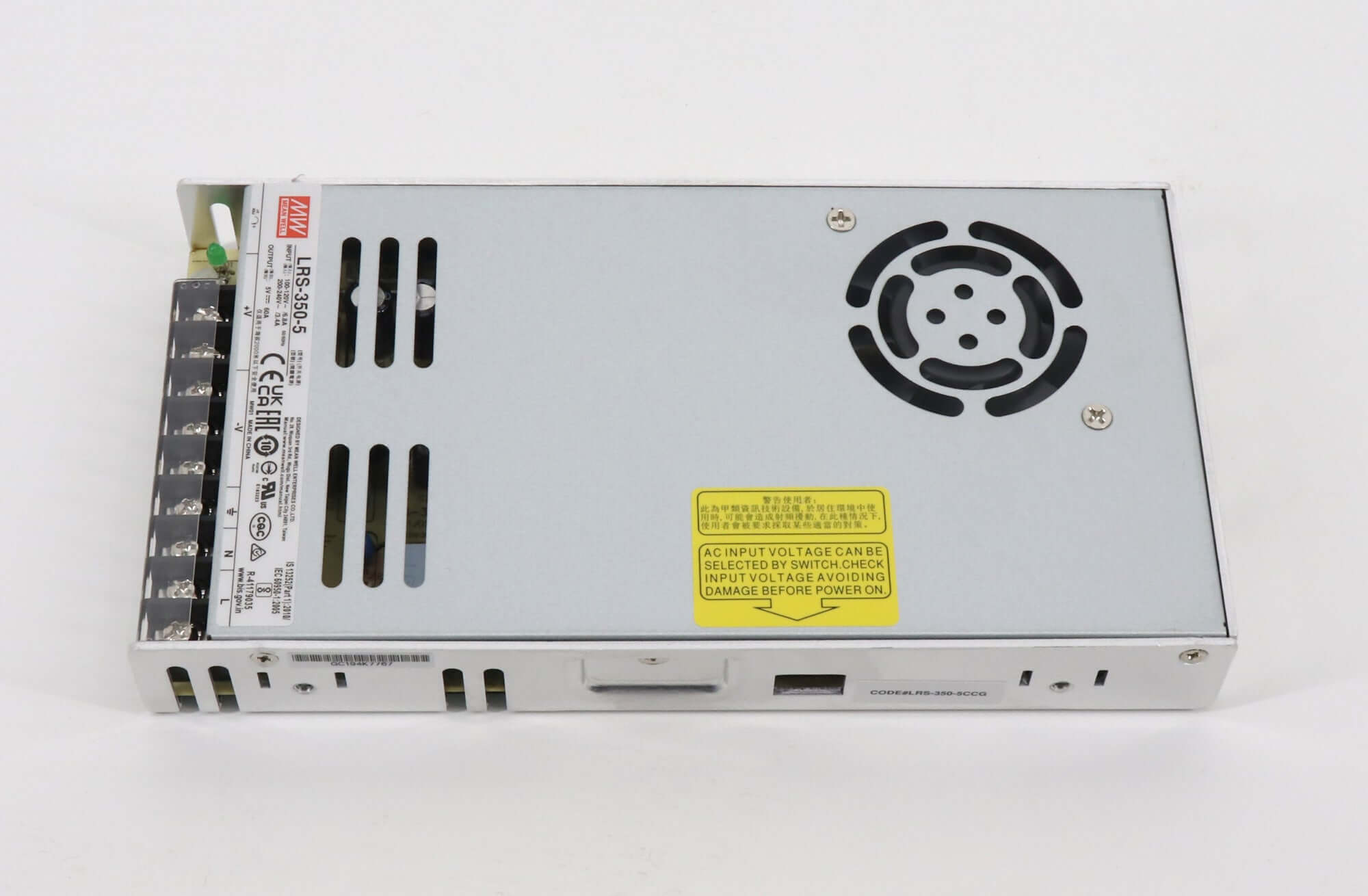
| Meen goed LRS-350-5 | 5V, 60A, 300W rated. The manufacturer’s input range is 90–132VAC or 180–264VAC, switch selected. | Confirm the ordered model’s input configuration and fan clearance with the technician. |
| Mean Well LRS-300E-5 | 5V, 60A, 300W rated. Datasheet lists 180–264VAC and convection cooling. | Check the 230V-class site feed and the rated mounting conditions. |
Check mounting, cooling and the DC harness
Ask the technician to compare the original supply’s mechanical drawing with the one for the proposed substitute. The LRS-350-5 en LRS-300E-5 are both rated at 5V and 60A and both are 30 mm (1.18 in) high. The LRS-350-5 has a fan. The LRS-300E-5 cools by natural convection. In the actual cabinet, compare airflow, terminal positions, mounting holes, harness fit and the clearance around the part before signing off on the change.
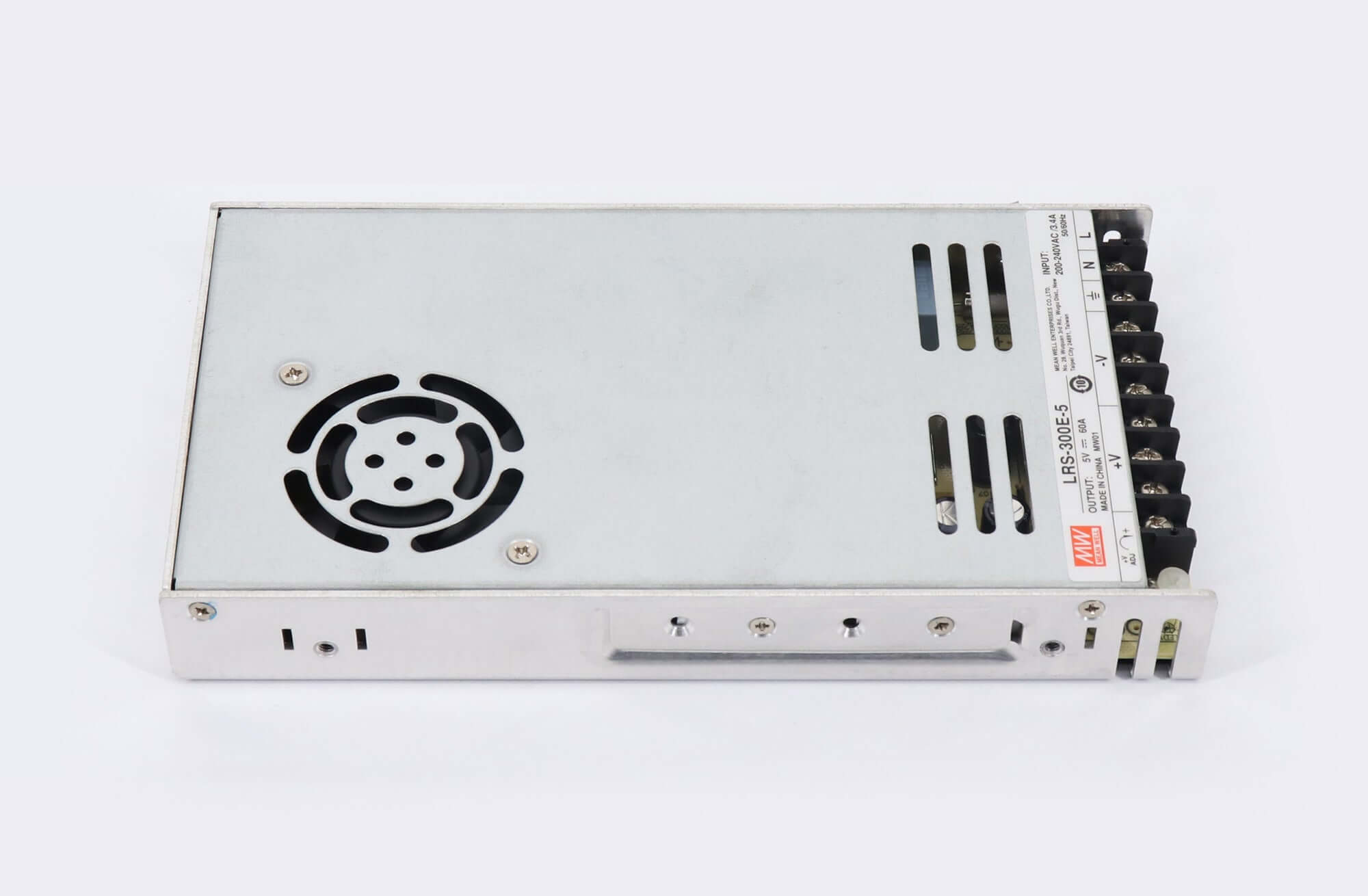
For the DC harness, record terminal locations, hole spacing and approved connector part numbers. Have the technician confirm polarity and grounding against the cabinet documentation and check that the protections and approvals still apply to the complete assembly. If the vendor proposes a harness change, ask what the proposed model needs. The LED-Mall LRS series reference can help identify candidate suffixes. Use the current manufacturer document for the exact model.
Turn the approval into a purchase order
Put the approval on the line item
Put the exact part number, cabinet revision and quantity on each order line. If the vendor offers an alternative, request the proposed part number and datasheet revision and ask why it differs. Check whether it is already listed as an approved spare for that cabinet. If it needs new approval, attach the sign-off to the quote and purchase order before the buyer commits to the SKU.
For example, if you need two units for this week’s repair and six for stock, give the vendor both quantities and ask whether all eight will carry the same approved suffix. If the two groups would come from different production revisions, check each revision against the approval and label the stock accordingly.
When a batch serves several generations of cabinets, have the receiving team check the labels against the approved order and store them by cabinet type. The approved model and cabinet location belong together on the spare record. If two cabinets look identical but take different feeds, give them separate inventory lines even when the shipment is going to the same address.
Define what a sample must satisfy
Agree on what the alternate has to prove in one cabinet before you order a batch. Ask the technician to check it at the expected load and temperature, review startup, and confirm that the voltage at the devices stays in range. Keep the label, cabinet and datasheet revisions, and any operating restriction with the acceptance record so the next buyer can tell which sample passed.
Put operating limits on the spare record
Say the cabinet maker signs off on a particular suffix for an indoor enclosure with a documented airflow path. Record that limit on the spare record. Use the approval for the indoor cabinets and keep the outdoor cabinets on a separate purchase line pending review.
Before reusing an old quote, check that the receiving team has the same cabinet drawing used for approval. Send a changed module layout or AC feed back for review. The drawing number on the purchase record gives the buyer a way to catch revisions that arrived after the original approval.
Veelgestelde vragen
Which figure should I use for continuous output on the Megmeet MCP200WS-4.5A-B?
Use the full specification and the approved cabinet conditions. If the procurement depends on more than the separately listed normal power figure, ask the vendor to reconcile the tabulated ratings in writing for the part and installation being quoted.
How do I source a 4.5V LED power supply when the nameplate is unreadable?
Request the cabinet build sheet and a photo from a known equivalent cabinet revision. An original purchase line or supplier part number can help if it is explicitly tied to the current cabinet. Send the evidence and unresolved differences to the cabinet maker for identification.
Does matching the output current prove a replacement is suitable?
Match the required output voltage and then compare the available current at the installation’s temperature and supply voltage. Check any separate power and transient restrictions before accepting the current claim on a quote.
Can I use two smaller supplies as one replacement?
That changes the cabinet’s electrical design. Splitting a load across documented independent branches and connecting outputs in parallel are different designs with different requirements. Ask the cabinet maker to review its approved supply arrangement and protection before ordering parts for a redesign.
Why does a service report mention ripple or a startup spike?
Ripple describes periodic AC variation on the DC output. Startup behavior is a separate event. Both can matter to a load even when the sustained reading is within range. Ask the technician for the comparison against model-specific limits and the measurement conditions.
Can I carry over the spare order to the next cabinet generation?
Use the approved parts list for that generation. Reconfirm its branch loads, input requirements and mechanical drawing before carrying the SKU over. Keep the cabinet revisions and approved quantities visible on the order.
Confirm the model before ordering
If the cabinet maker and technician have confirmed the 4.5V LED power supply, order the exact suffix on the approved record. If the part is unavailable or you have a conflicting label, ask LED-Mall to identify or quote the replacement. Send the cabinet revision, nameplate photo, documented branch voltage, confirmed load, AC input, mounting constraints and quantity. Ask for the offered SKU and specification on the quote so the technician can check the actual part.